Costs
Part of 9 points on city and county licenses that matter
Four free city and county systems: parcel viewer, code library and more
Four free city and county systems: parcel viewer, code library, permit portal and meeting record, with what each answers and where it stops.
Local government publishes more than any other layer, through four systems that were never built to talk to each other. Each answers one question. Each stops somewhere specific.
The four below are real, free, and run by the jurisdiction whose rules you are trying to find. No product replaces them, because no vendor holds the parcel record, the adopted code, the inspection history or the agenda.
Everything here gets you to the counter with a better question. None of it produces the answer. Counter staff, the planning office, and for anything consequential a lawyer, decide.
If you do not know which offices exist for a business like yours, the federal starting point for new businesses routes you to state and local offices rather than answering for them. That is the right shape for anything local.
What to take away
- The parcel viewer answers who has authority over a piece of ground. Start there, because its parcel number is the key every other local office uses.
- The code library answers what the jurisdiction wrote. Read the definitions section before you search, or your trade name will match nothing.
- The permit portal answers what was approved at an address. An empty history is not a clean history; older records may still be on paper.
- The meeting record answers what is about to change. Agendas and staff reports appear weeks before adoption.
- Every system shows a state of affairs on a date. Write down the date you looked.
The parcel viewer
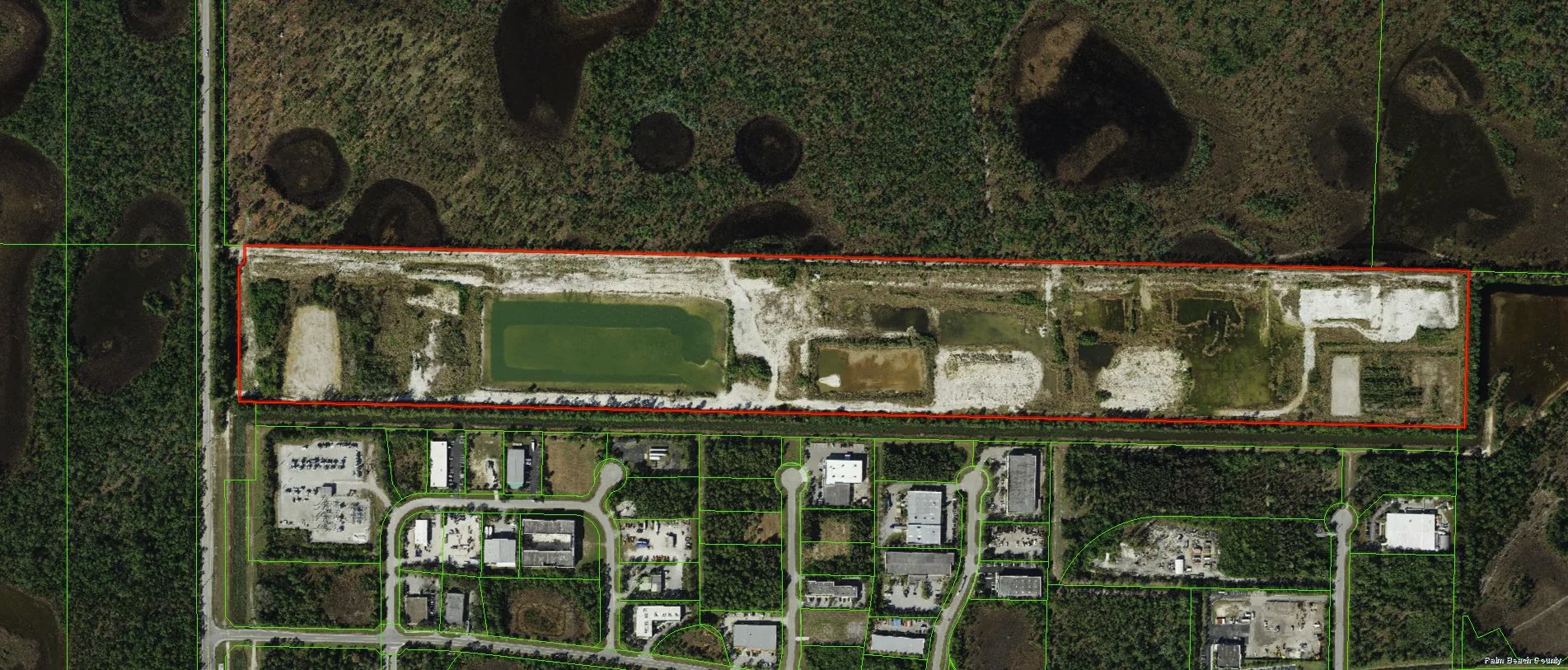
Most counties, and many cities, run an interactive map that returns a record when you click a property. It is the first system to open and the one people skip.
Parcel Viewer: Gives vs. Doesn't
What you get
- Parcel number
- Yes
- Jurisdiction
- Yes
- Zoning designation
- Yes
- Overlays
- Often
- Use permitted
- —
- Lease or title
- —
What it does not tell you
- Parcel number
- —
- Jurisdiction
- —
- Zoning designation
- —
- Overlays
- —
- Use permitted
- No
- Lease or title
- No
What you get. The parcel number, the jurisdiction including whether the site sits inside city limits, the zoning designation, and often the overlays and special districts the parcel falls in.
What it does not tell you. Whether your use is permitted in that zone. The map shows the district; the code's use table, read with the counter, decides the category. A parcel viewer also knows nothing about a lease, an association, or a restriction on the title.
How it fails. Addresses are unreliable keys. Corner lots, rear units and recently subdivided land return the wrong parcel or none. Click the map instead of typing, then confirm the parcel number with the counter.
Named examples worth opening once to see the shape:
- King County, Washington runs Parcel Viewer on its iMap platform.
- Clark County, Nevada runs OpenWeb.
- New York City's ZoLa (Zoning and Land Use) shows zoning and overlays for all five boroughs.
- Toronto's Zoning By-law Map does the same job north of the border.
The code library
Cities and counties publish adopted codes through hosted sites, usually searchable, usually with a "current through" date near the top.
Code Library: Search Terms
Your words
- Search term
- Your trade name
- Result
- Nothing
- Date check
- —
- Pending rules
- —
The code's words
- Search term
- Use category
- Result
- The table appears
- Date check
- Codification date
- Pending rules
- Separate list
What you get. The adopted text organized by subject: the zoning title with its use table and definitions, the business licensing title, sign rules, and the building and fire codes with local amendments.
What it does not tell you. How the counter applies it. What makes an application complete, and how an ambiguous category gets read in practice, are administrative and often absent from the code.
How it fails. Code-site search matches words, and your words are not the code's words. Search your trade and you find nothing; search the use category the definitions section uses and the table appears. Note the codification date too, because recently passed ordinances often sit in a separate pending list.
Named examples include the following:
- Municodehosts codes for thousands of municipalities.
- Code Publishingand American Legal Publishing cover many more.
- eCode360(General Code) is common in the Northeast.
- Seattle's Municipal Code and Vancouver's Streetwise-style bylaw portals show what a well-indexed local library looks like.
The permit portal
Many local governments run an online permit system where applications are filed, fees paid, inspections scheduled and status tracked.
Permit Portal: What It Shows
What you get
- Your applications
- Status, comments
- Address history
- Applied, finalled
- Open permits
- Yes
- Work matches record
- —
- Unpermitted work
- —
What it does not tell you
- Your applications
- —
- Address history
- —
- Open permits
- —
- Work matches record
- No
- Unpermitted work
- Becomes yours
What you get. Two things, and the second is undervalued. First, your own applications, their status and the inspector's comments. Second, the permit history of an address: what was applied for, approved, finalled, and left open by a previous occupant.
What it does not tell you. Whether the work you can see in a space matches the work on record. That comparison is done by eye, then confirmed with the building department. Unpermitted work found during your own application tends to become yours to resolve.
How it fails. Older records may never have been digitized, so an empty history is not a clean history. Ask the department whether paper records exist for the address before concluding anything.
Named examples: Accela powers portals in San Diego and many large counties; Citizenserve and OpenGov (formerly ViewPoint) cover mid-size cities; Austin's Austin Build + Connect and Chicago's portal are city-run; Toronto's building permit search is public.
The meeting record
Councils, boards of supervisors and planning commissions publish agendas, packets and minutes. Few people read them, and they are the only place local change is visible before it happens.
Meeting Record: What to Read
What you get
- Proposed ordinances
- Weeks early
- Zoning amendments
- Yes
- Fee resolutions
- Yes
- Staff reports
- Yes
- Whether it passes
- —
- Final form
- —
What it does not tell you
- Proposed ordinances
- —
- Zoning amendments
- —
- Fee resolutions
- —
- Staff reports
- —
- Whether it passes
- No
- Final form
- No
What you get. Proposed ordinances, zoning amendments, fee schedule resolutions and the staff reports behind them, weeks before adoption. Also public hearing notices, which sometimes reach owners near an affected parcel and sometimes only the notice board.
What it does not tell you. Whether a proposal will pass, or in what form. Read them for direction and act on adopted text.
How it fails. Volume. The useful habit is searching published agendas for your zoning district, your street and your use categories, at a fixed interval you already keep. The compliance calendar is where that interval lives.
Named examples: Legistar (Granicus) hosts agendas and minutes for hundreds of US cities; CivicPlus and PrimeGov cover many more; BoardDocs is common for school and county boards.
Keys, and why searches fail
The key it wants
- Parcel viewer
- A point on the map or a parcel number
- Code library
- A code section or the code's own category word
- Permit portal
- An address as the system formats it, or a permit number
- Meeting record
- An agenda date or an item title
What you probably have
- Parcel viewer
- A mailing address
- Code library
- Your trade name
- Permit portal
- An address as you write it
- Meeting record
- A vague worry
Translate before you search. The parcel viewer turns an address into a parcel number. The code's definitions section turns your trade into a category. Find the permit portal's address format by searching a neighbor you know.
System Keys and What You Have
System
- Parcel viewer
- Map point or parcel number
- Code library
- Code section or category
- Permit portal
- Formatted address or permit number
- Meeting record
- Agenda date or item title
Key it wants
- Parcel viewer
- Mailing address
- Code library
- Trade name
- Permit portal
- Your address format
- Meeting record
- Vague worry
What you have
- Parcel viewer
- Code library
- Permit portal
- Meeting record
The habit generalizes: every local system indexes on something it chose. The fundamentals of the four layers rest on describing your business in the terms each office uses.
Telling the government's system from an imitation
Spotting the Government's Own System
- Government domain
- Jurisdiction named plainly
- Fee schedules readable before entry
- Phone number reaches a specific office
- No sales language about deadlines
A site that wants your details before showing you a rule is selling something. That may be convenient, but it is not authority. The counter tells you the same thing free.
When you cannot tell them apart, counsellors at an SBA resource partner work in your area, cost nothing, and will name the office and the system your jurisdiction runs.
What to keep locally
Systems change and records get re-indexed. A page you relied on can be replaced without notice.
What to Keep Locally
- Dated parcel record
- Code section as it read that day
- Permit history
- Agenda item
- File with site's approvals
Keep dated copies of anything you relied on when you signed: the parcel record, the code section as it read that day, the permit history, the agenda item. File them with the site's approvals. Evidence you cannot produce is one of the exposures the local overview describes as arriving through customers and counterparties, not the government.
Common questions
Is there one search that covers all four?
No, and a service claiming to combine them is filtering the same public records with a keyword guess. Open the government's systems yourself; the parcel viewer takes a minute and the others follow from it.
The code site and the counter disagree. Which is right?
The code is the written rule and the counter is how it is applied. Where they differ, the counter's reading is what you will meet. Write down who said what, and if money turns on it, take the question to a lawyer in that jurisdiction.
Do home-based businesses need any of this?
The parcel viewer and the code library, certainly, because the home-occupation section of a zoning code is the rule most home businesses have never read. Home business rules covers why that section and the private restrictions on the property have to be read together.
Are these four systems free to use?
Yes. All four are public records, funded by the jurisdiction and open without an account. Some portals require registration to file an application, but searching permit history and reading agendas stays free.