
Industry
Alberta privacy law and Calgary energy firms' document control needs
Productivity software reviews for Calgary energy firms must map Alberta PIPA duties, OIPC Alberta breach reporting steps, and document controls.
What to take away
- Productivity software reviews for Calgary energy firms often skip Alberta PIPA duties, so teams pick tools that cannot meet access and breach rules.
- Alberta's private-sector law, PIPA, requires safeguards, access responses, and notification to the OIPC when a real risk of harm exists.
- Document control needs permissions that follow field and office roles, plus retention schedules that match engineering records.
- Breach reporting runs on a clockcontain the incident, assess harm, notify the OIPC and affected people, then keep a record.
- Vendor reviews should test file-sharing controls, audit trails, and project management controls before a pilot starts.
For licensecompliancerules.com readers, the through-line is compliance governance. A Calgary energy firm's privacy duties sit beside business licensing, registration, and filing obligations.
U.S. companies that work in Alberta, hire Calgary contractors, or keep records across the border need the same evidence trail for privacy that they keep for licenses and renewals.
The steps below show how document control supports that record: named owners, access approvals, audit logs, retention schedules, and breach records. Treat them as part of the compliance rule set, not a separate software project.
PIPA duties for Calgary energy firms
Alberta's private-sector privacy law is the Personal Information Protection Act, usually called Alberta PIPA. It applies to provincially regulated businesses, which covers most Calgary energy service companies, engineering consultancies, and their contractors. The Office of the Information and Privacy Commissioner of Alberta enforces it.
Federal works such as interprovincial pipelines may fall under PIPEDA instead, so a Calgary firm can face two regimes at once. The federal privacy commissioner sets out how provincial and federal statutes overlap across Canada in its overview of privacy laws in Canada.
PIPA rests on ten principles, but four matter most for document control. Consent must be meaningful when personal information is collected, used, or disclosed. Collection must be limited to what a project actually needs. Safeguards must be reasonable for the sensitivity of the data. And individuals have a right to access their information and ask for corrections.
Energy work adds a twist. Seismic data, landowner records, and contractor files mix personal information with commercial assets, so a single repository can hold both. That mix makes blanket permissions risky.
Sensitive data raises the bar. Health information from a field injury, biometric data from site access scanners, and genetic test results sit in a stricter category.
The Office of the Privacy Commissioner of Canada explains how health, genetic, and biometric information is treated under Canadian law in its guidance on health information, genetics and biometrics.
If a Calgary firm stores those records in the same drive as ordinary project files, the safeguards for the whole drive should match the most sensitive item inside it. That single rule changes how folders and permissions get designed.
A practical first step is a data map. List every system that holds personal information: project management platforms, shared drives, field tablets, HR tools, and subcontractor portals. For each, note who can access it, where it is stored, and how long it is kept.
That map becomes the basis for permission design and retention. Without it, a privacy policy is just a document nobody follows.
OIPC Alberta breach reporting steps
Alberta requires notification when a breach creates a real risk of significant harm. The test is not whether data left the building, but what harm could follow for the people involved. Identity theft, financial loss, humiliation, and damage to reputation all count.
The OIPC expects a report without unreasonable delay once the organization knows or ought to know about the incident.
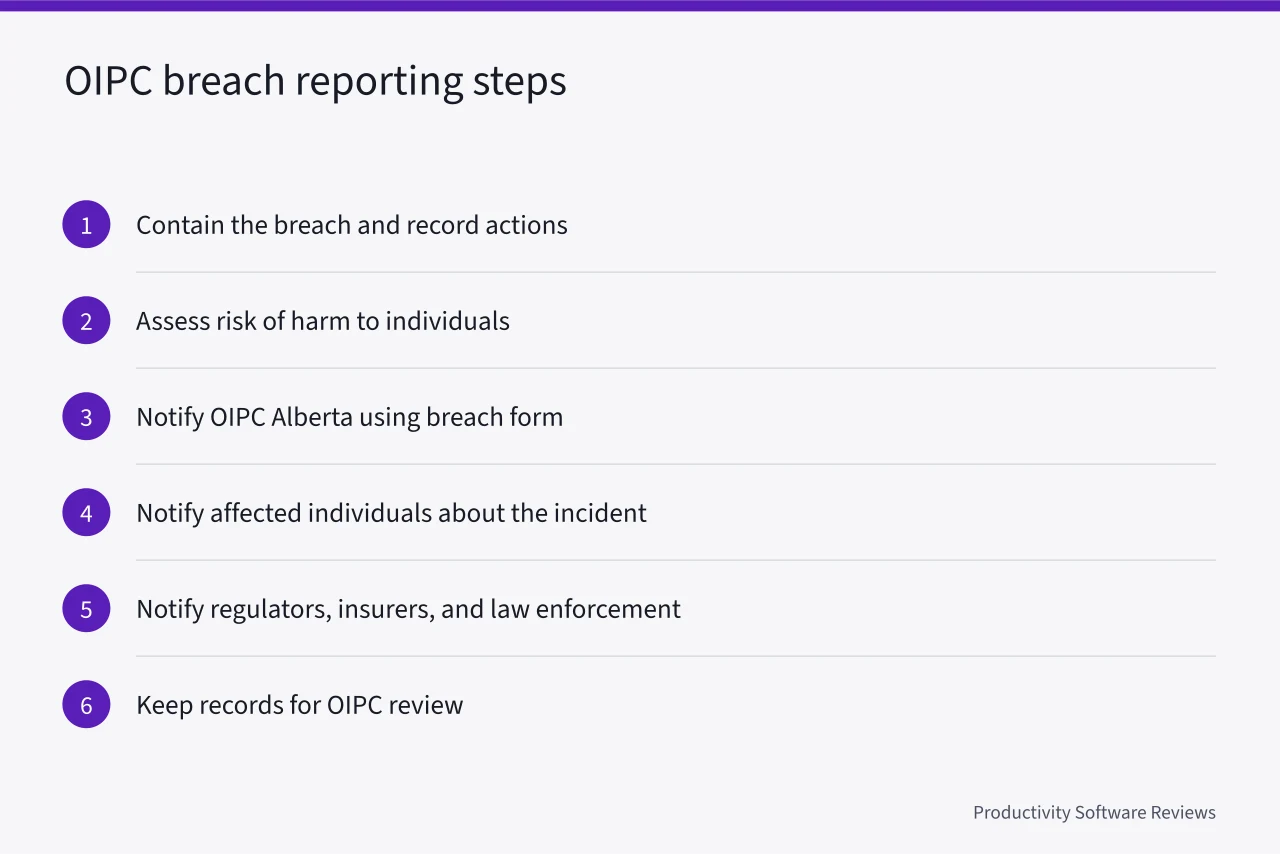
The clock matters more than the paperwork. A Calgary energy team that discovers a misconfigured folder on a Friday should not wait for a Monday meeting. Contain first, then assess, then report. The OIPC can ask for the assessment even if the firm decides notification is not required, so write down the reasoning.
The report goes to the Office of the Information and Privacy Commissioner of Alberta. The OIPC publishes a breach report form on its website, oipc.ab.ca, and takes reports through that online portal.
Its contact page lists office phone numbers, a toll free line, and an email address for questions about the threshold. PIPA sets no day count, so the date you became aware is the fact that matters most.
Write that date down, and keep a record of every breach, reported or not. Federal PIPEDA requires breach records to be kept for 24 months, and a PIPA-only firm can adopt the same period as a default.
Breach reporting also depends on evidence. If nobody can say who opened a file or when a permission changed, the assessment becomes guesswork. That is why audit trails belong in the tool selection checklist, not in a later cleanup project.
A system that supports document management software for law firms with clear audit logs turns a panic into a timeline.
Document control for project management and file sharing
Document control means knowing what a document is, who may see it, where it lives, and when it goes. For Calgary energy and engineering firms, that covers drawings, permits, land agreements, inspection reports, and safety records. Some hold personal information. Others hold commercial assets. Many hold both.
Project management controls decide who can create, edit, approve, and delete records inside a project workspace. File-sharing controls decide how those records move outside it: links, guest access, downloads, and sync clients. The two must agree. If a project tool lets any member invite a guest, then file-sharing permissions are only as strong as the loosest project role.
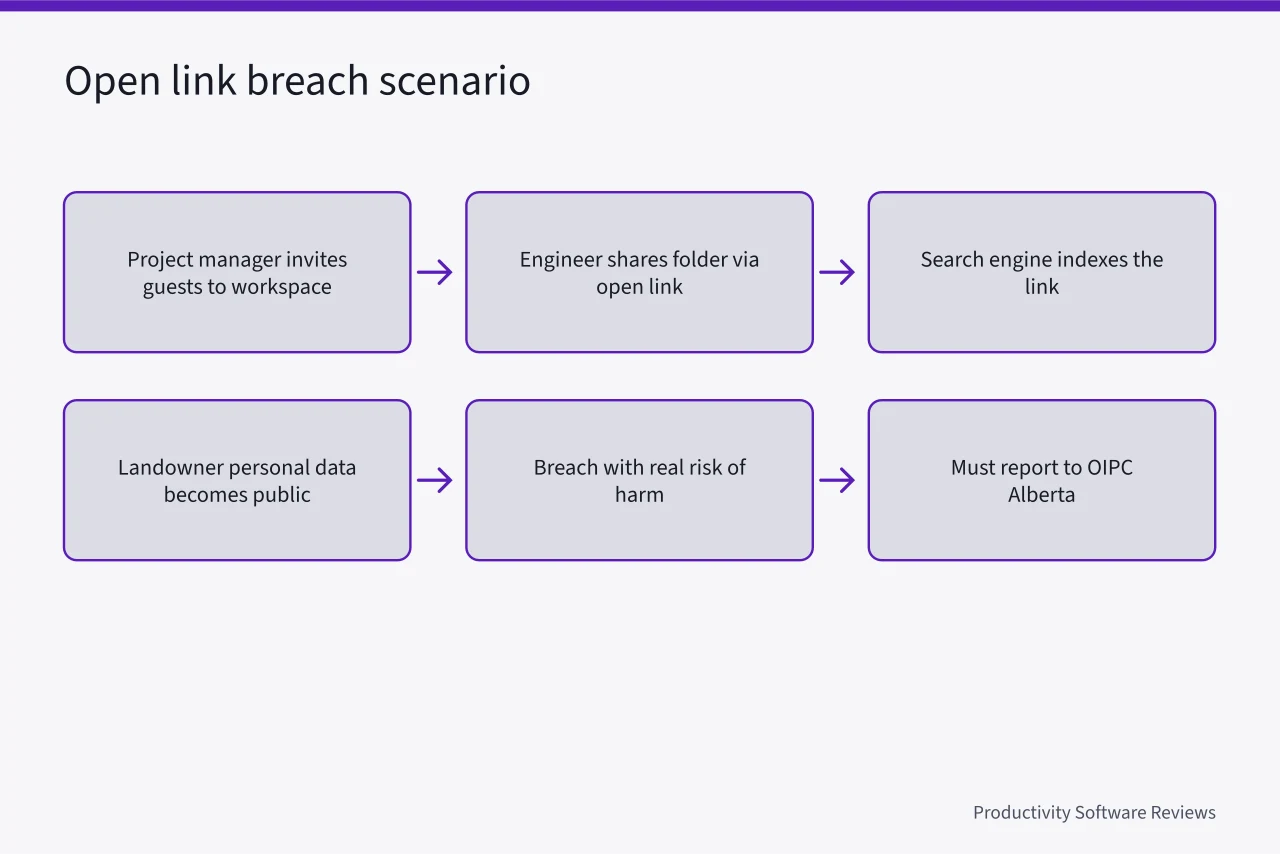
A worked example shows the risk. A Calgary pipeline engineering firm runs a project workspace with three roles: project manager, engineer, and field inspector. The project manager can invite guests. An engineer shares a folder with a subcontractor using an open link.
The link is indexed by a search engine. A landowner's name, address, and compensation details become public. Under PIPA, that is a breach with a real risk of harm, and the firm must report it to the OIPC.
The fix is not one setting. It is a pattern: guest invites require approval, external links expire, downloads are logged, and sensitive folders sit in a separate permission group. Teams that plan this before the first folder exists avoid retrofitting controls onto thousands of files.
Configuring permissions for field and office teams
Field and office teams need different access. A field inspector on a tablet may need offline access to the drawings for one site. An office engineer may need read access to every project in a region. A finance analyst may need contract values but not technical files.
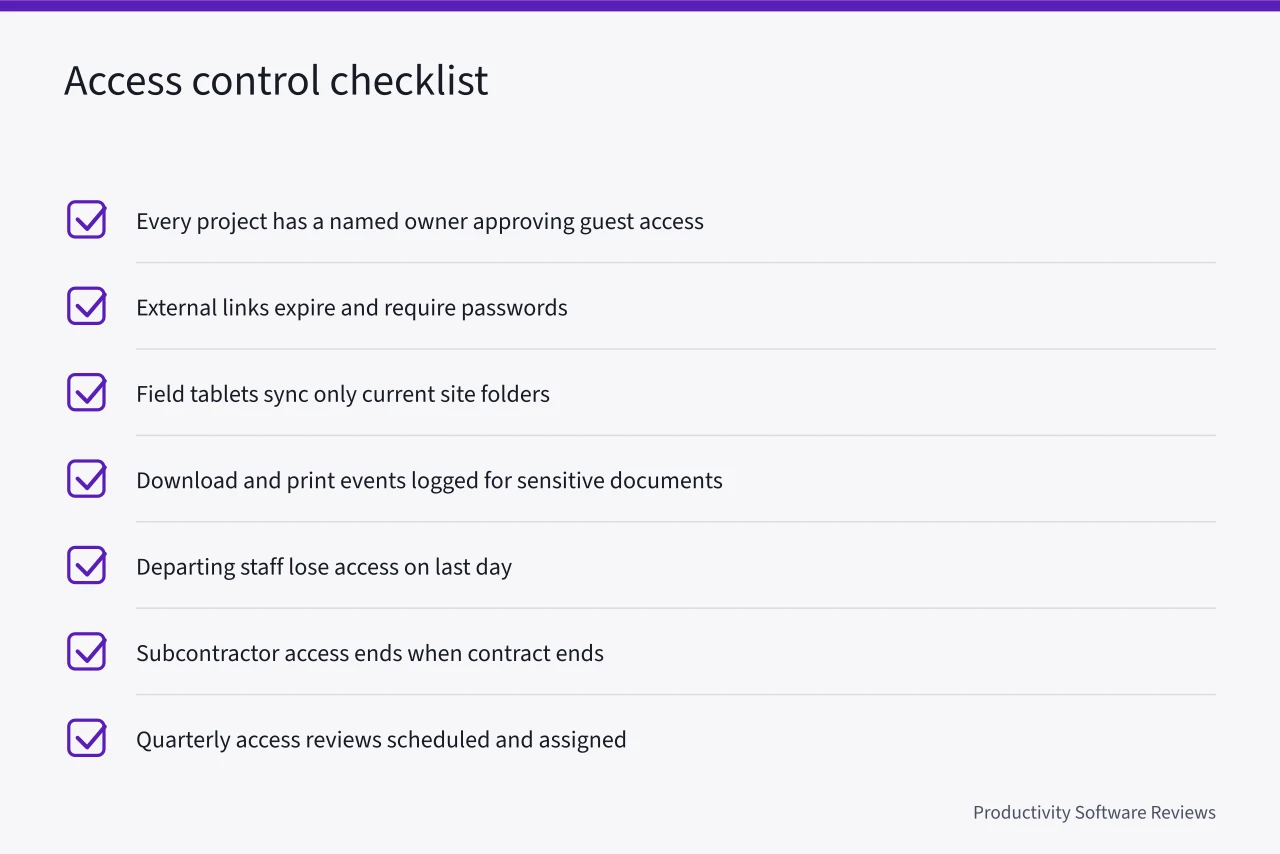
Permissions should follow the role, not the person, so turnover does not leave stale access behind.
Start with groups, not individuals. Create groups for each role and assign permissions to the group. When someone changes jobs, move them between groups. When someone leaves, remove them from all groups. This sounds basic, but shared drives in Calgary energy firms often carry years of one-off permissions that nobody dares remove.
- Every project has a named owner who approves guest access.
- External links expire by default and require a password for sensitive folders.
- Field tablets sync only the folders needed for the current site.
- Download and print events are logged for sensitive documents.
- Departing staff lose access on their last day, not the following week.
- Subcontractor access ends when the contract ends.
- Quarterly access reviews are scheduled and assigned.
Mobile access deserves separate attention. Field teams often work in areas with poor connectivity, so tools cache files on devices. A lost tablet then becomes a breach. Require device encryption, remote wipe, and a short offline session timeout. If the tool cannot do that, it should not hold sensitive records.
Retention schedules for engineering records
Retention is where privacy law and engineering practice meet. PIPA says do not keep personal information longer than necessary. Engineering standards, contracts, and tax rules say keep some records for years. The schedule must satisfy both.
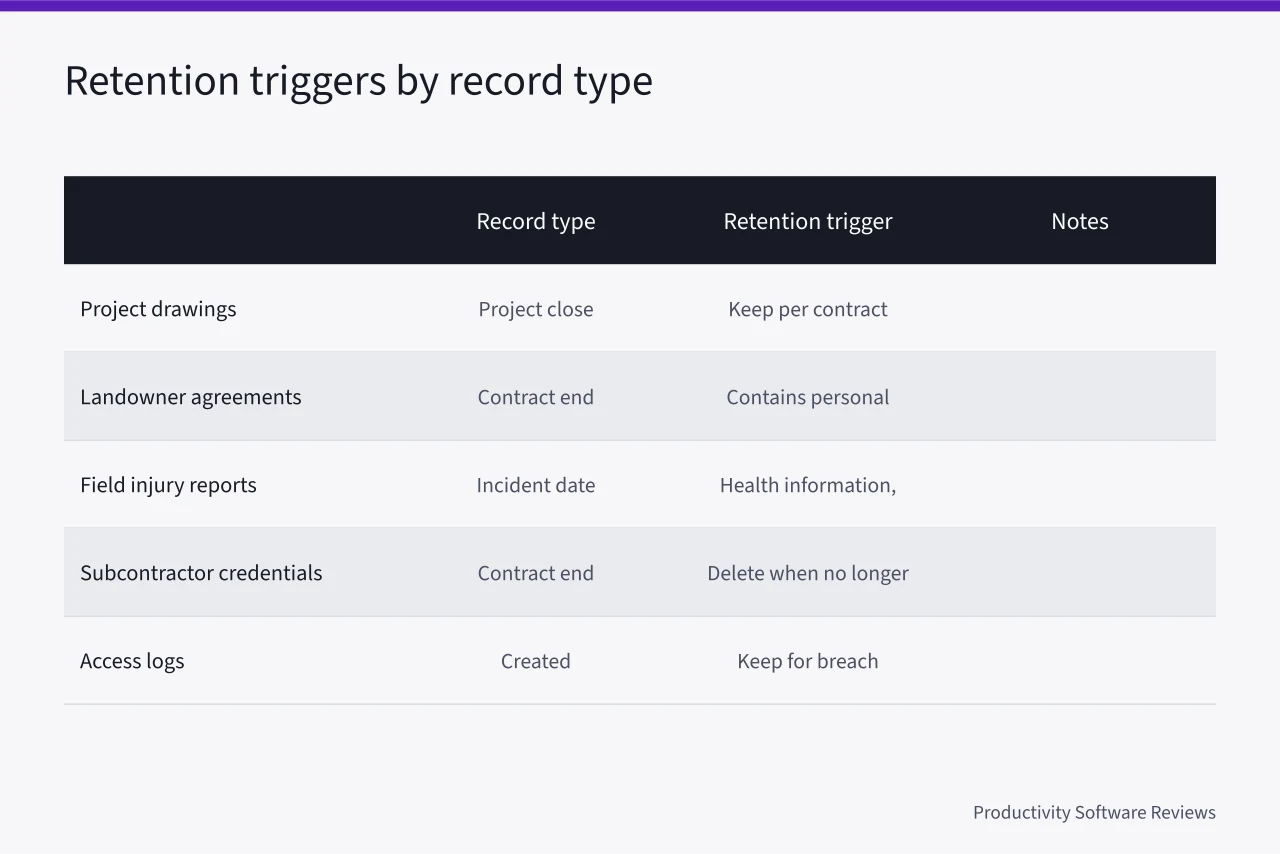
A workable schedule names record types, retention periods, and the trigger that starts the clock. For a Calgary energy firm, the trigger is often project close, contract end, or the date of an incident. Personal information inside a long-lived engineering record should be minimized or separated so it can be deleted on its own timeline.
| Record type | Typical retention period | Typical retention trigger | Notes |
|---|---|---|---|
| Project drawings and as-builts | Life of the asset, commonly 25 to 40 years | Project close | Keep per contract and engineering standards |
| Landowner agreements | Life of the easement or lease, often 20 years or more | Contract end | Contains personal information, restrict access |
| Field injury reports | 5 to 10 years | Incident date | Health information, stricter safeguards |
| Subcontractor credentials | 3 to 7 years | Contract end | Delete when no longer needed |
| Access logs | 12 to 24 months | Created | Keep long enough for breach investigations |
Each period above is a typical range. The exact number comes from the contract, the engineering standard, the tax rule, or the limitation period that applies to the record.
Retention also affects vendors. If a software provider stores backups in another country, deletion may not be immediate. Ask where data lives, how backups are purged, and whether the provider can produce a deletion certificate.
Canadian business and industry rules add their own record-keeping duties, and the federal government's business and industry pages are a starting point for regulatory context.
When a vendor cites a statute in its review or contract, check the actual text. The Justice Laws Website indexes federal statutes, and provincial laws are published by their own jurisdictions.
What productivity software reviews miss about Alberta rules
Most productivity software reviews compare features, not duties. They score task views, integrations, and mobile apps. They rarely ask whether a tool can restrict access by role, log downloads, or delete personal information on a schedule. For a Calgary energy firm, those gaps decide whether the tool is usable.
A review that applies to Alberta should answer five questions. Can the tool separate personal information from commercial records? Can it enforce guest access approval? Can it produce an audit trail for a breach assessment? Can it apply retention rules by record type? Can it keep data in Canada if the contract requires it?
If a review does not answer these, it is a feature list, not a buying guide.
Four common choices show what to look for on those five questions. Microsoft 365 covers SharePoint, Teams, and OneDrive. Sensitivity labels separate personal information from commercial records, and retention labels apply periods by record type. Guest access can be capped to approved domains or require owner approval.
Purview audit logs record file opens and permission changes. Microsoft publishes Canadian data residency commitments, so ask which services are covered in your tenant.
Google Workspace, meaning Drive and Vault, restricts sharing to allowlisted domains or target audiences, which separates sensitive folders from general project files. Admin logs cover sharing and download events. Vault retention rules hold or delete by label. Ask whether a Canadian data region covers the services you need.
Box and Dropbox Business both support expiring links, password protected links, and admin audit logs. Box applies retention policies by metadata and can flag files that hold personal information. Dropbox applies retention on its higher business plans. External collaborator settings can require approval. Regional storage exists; confirm Canada is available on the plan you buy.
Construction platforms such as Procore and Autodesk Construction Cloud map permissions to project roles, so field and office access follows the job rather than the person. External collaborator access has approval settings, and project level audit logs exist. Retention and archive controls vary by product and tier; check the enterprise plan. Canadian storage depends on the contract.
Task tools such as Asana and monday.com are not document repositories, so they should not hold personal information.
The federal privacy commissioner's privacy for businesses guidance describes the safeguards expected of organizations, and those expectations translate directly into software requirements. A tool that cannot meet them becomes a manual process, and manual processes fail during busy project cycles.
Vendor reviews also miss the split between project management controls and file-sharing controls. A strong project tool with weak sharing settings still leaks. A strong sharing tool with no project roles still confuses access. Buyers should test both in a pilot with real roles, real files, and a real retention rule.
That is how a Calgary team finds out whether the software supports PIPA duties before the OIPC has to ask. A shortlist should be judged on those tests, not on feature counts.